
Getting Started Using AI in Arigato
Arigato makes it easy to integrate AI into your Workflows, Actions, and Conditions, whether you need dynamic content generation, automated decision-making, or intelligent data processing. This guide will help you understand the different AI options available in Arigato and when to use each.
AI Options in Arigato
Arigato provides a few primary ways to use AI:
- Built-in AI in Actions - Included in most Actions. Just click the stars in the tray and write your own prompt.
- Inline AI (AI Filter) – Use AI dynamically anywhere in the app, modifying data on the fly.
- Standalone AI Actions – Run AI queries as independent steps in your Workflow, storing or logging results for later use.
- Conditions - AI Decisions or Custom Conditions can utilize AI.
- Custom Actions - Call AI within a larger Custom Action.
Built-in AI on Actions

Once you've connected your Arigato account to the AI service of your choice on the Integrations page, anywhere you see the tray, click on the stars icon. The app will automatically send the current context along with a default prompt or your own prompt. For testing, select a test item then click the eye icon to get a preview. This system is ideal for everyday AI use in the app.
AI Filter: Inline AI Processing Anywhere
The ai filter sends a prompt to the AI provider you’ve configured as the default in Integrations.
Basic Usage
{{ "Tell me a joke" | ai }}
Example output: "Why don't skeletons fight each other? They don't have the guts!"
Using Context for Smarter Responses
AI can understand your Shopify data when you provide context. For example, to get a list of product tags:
{{ "Return a comma-delimited list of tags. Return only the tags and no other text." | ai({context: product}) }}
This sends the entire product object to the AI, allowing it to extract relevant tags.
Additional Documentation
Learn about changing models, sending additional context and more in our technical documentation for the ai filter.
AI Actions: Standalone AI Processing
AI Actions allow you to run AI tasks independently within a Workflow. These are useful when you need to store, log, or reuse AI-generated content later in the process.
When to Use an AI Action:
- You need AI-generated data that will be used in later steps (e.g., saving a summary as a metafield or tag).
- You want to log AI responses for debugging or auditing.
- The AI response is a key part of a larger Workflow, such as summarizing an order history before sending an email.
Setting Up an AI Action
In general, you will need to set up the Integration for the provider you'd like to use, then add the corresponding Action for that provider. Check our specific Integration and Action documentation for your provider of choice for further instructions.
Using AI Action Data Later
All responses from AI Actions are stored temporarily in a special variable called "exec". You can access this data (and add to it) in the workflow. Check out the guide to using exec for details.
AI Powered Conditions
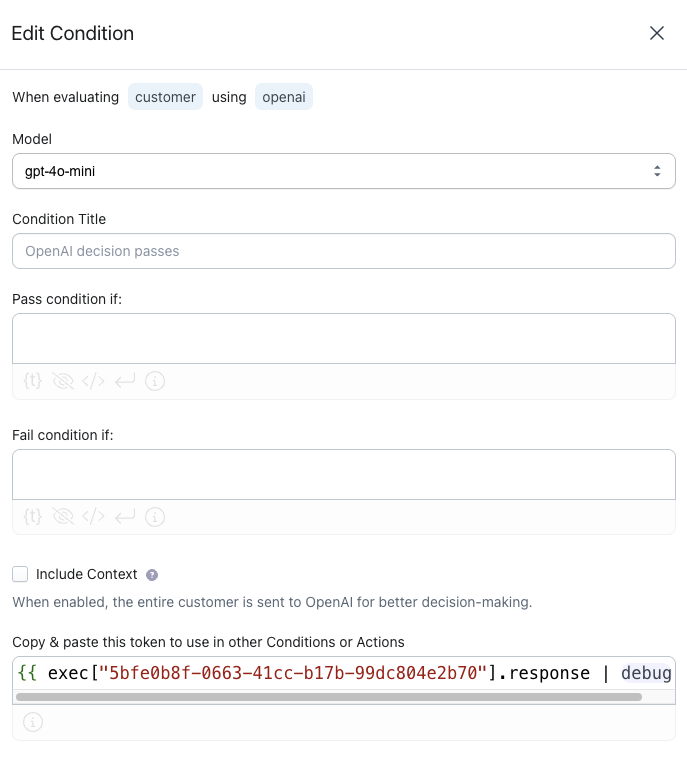
Choose "AI-Powered" under Conditions
 Choose the AI model you'd like to use and describe your pass and fail criteria. If you need the response in later steps, copy the Exec token.
 AI In Custom Conditions
 AI In Custom Conditions
AI can also be used in a Custom Condition to determined the answer to a true or false question. Consider the following Custom Condition:
{% set prompt = "Evaluate if this product description is up to standards. If it is up to standards, return the word TRUE. Otherwise return FALSE: " ~ product.description %}
{% set ai_response = prompt | ai %}
{% if ai_response == 'TRUE' %}
  TRUE
{% else %}
  FALSE
{% endif %}
Where You Can Use AI in Arigato
- Built-In AI: Use anywhere you see the stars icon.
- AI Filter (Inline AI): Modify and generate content dynamically in any Workflow, Action, or Condition.
- AI Actions (Standalone AI Processing): Generate AI responses that can be stored, logged, or used in later Workflow steps.
- AI Decision Conditions: Set up pass/fail criteria in a condition.
- Custom Conditions: Use AI to answer a true/false question using your own code for the logic.
- Custom Actions: Take full control by integrating AI with custom logic. Custom Actions use the ai filter.